go-pprof
golang pprof
标准库安装
package main

import (
    "net/http"
    _ "net/http/pprof"
)

func main() {
    go func() {
        // 在应用运行时启动 pprof 监听
        http.ListenAndServe("localhost:8080", nil)
    }()

    // 模拟业务逻辑
    select {}
}
//启动程序后,访问http://localhost:6060/debug/pprof/
Gin集成
//安装依赖
go get -u github.com/gin-contrib/pprof


//项目中引入
package main

import (
    "github.com/gin-contrib/pprof"
    "github.com/gin-gonic/gin"
)

func main() {
    r := gin.Default()

    // 启用 pprof 路由
    pprof.Register(r)

    // 模拟业务路由
    r.GET("/ping", func(c *gin.Context) {
        c.JSON(200, gin.H{
            "message": "pong",
        })
    })

    r.Run(":8080") // 启动服务
}
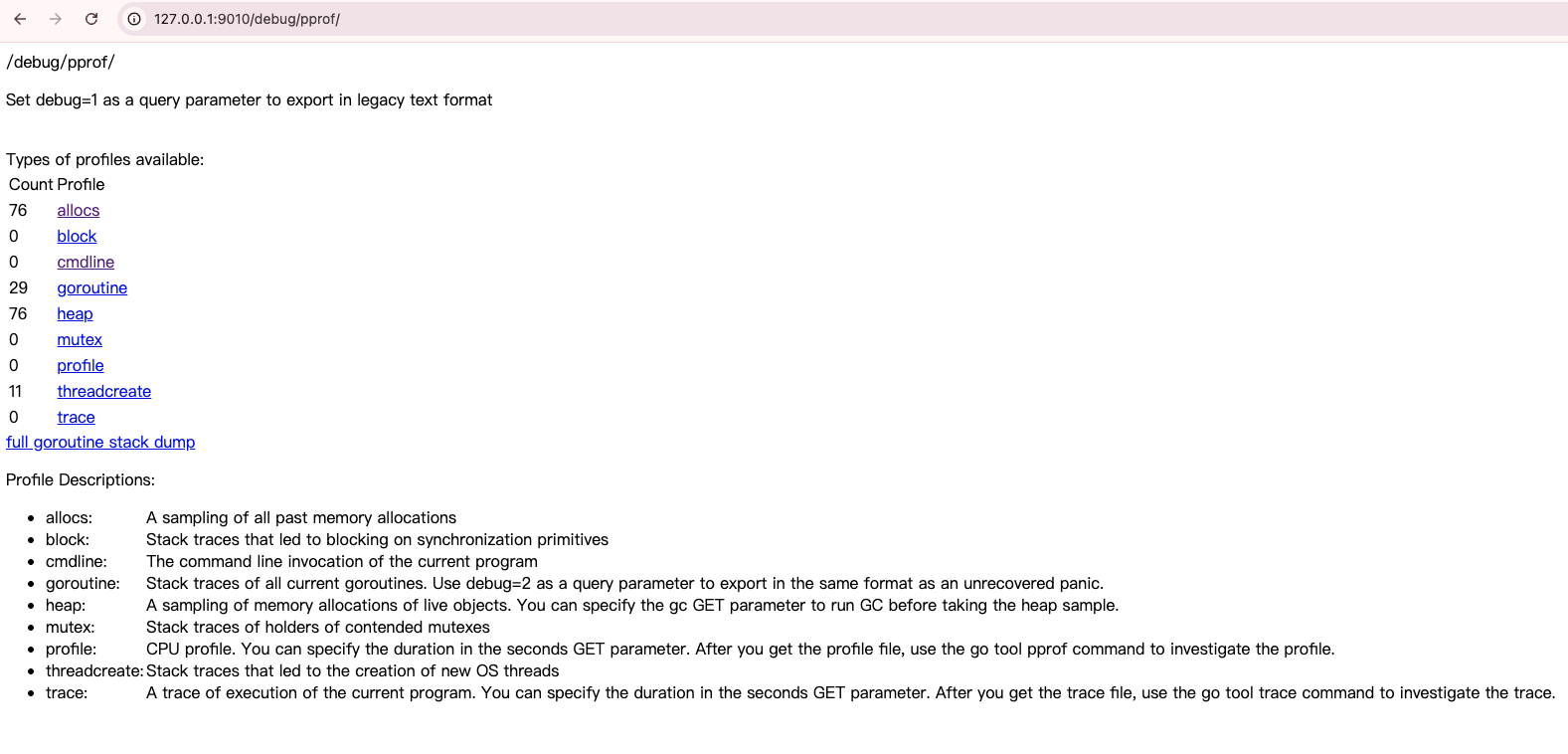
| Syntax | Description |
|---|---|
| allocs | 查看历史累计的所有内存分配的采样数据 |
| block | 查看历史累计的导致同步原语阻塞的堆栈跟踪 |
| cmdline | 包含进程的完整命令行信息,通常用于记录程序启动时的命令行参数 |
| goroutine | 实时查看当前所有运行的 goroutines 堆栈跟踪 |
| heap | 实时查看活动对象的内存分配情况 |
| mutex | 查看历史累计的导致互斥锁的竞争持有者的堆栈跟踪 |
| profile | 进行 30s 的 CPU Profiling,浏览器会转圈,30s 后下载一个分析用的 profile 文件 |
| threadcreate | 查看创建新 OS 线程的堆栈跟踪 |
| trace | 程序执行 trace, 和其他样本数据不同的是,这个需要使用 go tool trace 来分析。trace 是一种更详细的性能分析工具,用于跟踪程序的执行过程,包括函数调用、协程切换等。 |
方框中
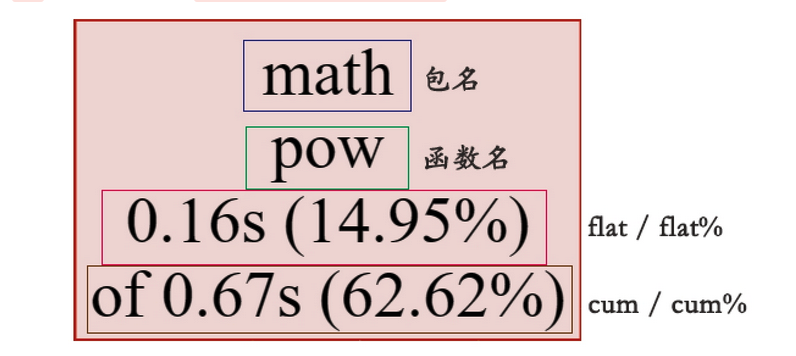 pprof
pprof
| Syntax | Description |
|---|---|
| flat | 是我们最关注的指标,它代表自身耗时,不包含内部调用。 |
| flat% | 自身耗时相对于总耗时的百分比 |
| cum | 自身耗时加上内部函数调用的总耗时 |
| cum% | 自身耗时加上内部函数调用的总耗时相对于总耗时的百分比 |
| sum% | 前 N 行的 flat% 之和。对于上述例子的第四行 58.88=19.63+16.82+14.95+7.48 |
//打开浏览器并带着view选项
go tool pprof -http=:8080 /Users/mac/pprof/pprof.samples.cpu.003.pb.gz

go tool pprof http://localhost:8080/debug/pprof/profile?seconds=30
1. 基本参数
-http=[host:port]
启动本地 Web 服务,提供交互式可视化分析界面(支持火焰图、调用关系图等视图切换)
go tool pprof -http=:8080 profile.prof # 访问 http://localhost:8080
-text
生成文本格式的性能报告,按函数耗时排序(默认输出前 10 项)
go tool pprof -text profile.prof
-proto
生成二进制格式的协议缓存文件(.pb.gz),用于后续进一步分析
go tool pprof -proto profile.prof > output.pb.gz
2. 数据采集参数
-seconds=N
指定 CPU 分析的采样时长(单位:秒),仅适用于实时采集的场景
go tool pprof -seconds=30 http://localhost:6060/debug/pprof/profile
-debug=N
控制调试信息输出级别(0 为静默,1 显示基本信息,2 显示详细日志
3. 视图生成参数
-top
生成文本格式的 Top 视图(按 flat 耗时排序),可结合 -nodecount 指定显示项数
go tool pprof -top -nodecount=20 profile.prof
-svg / -png / -pdf
生成指定格式的静态图像文件(如火焰图、调用关系图)
go tool pprof -svg profile.prof > flamegraph.svg
-traces
输出函数调用链的堆栈跟踪信息,用于分析阻塞或锁竞争问题
4. 过滤参数
-focus=REGEXP
go tool pprof -focus="json.*Marshal" profile.prof
-ignore=REGEXP
排除调用链中包含指定正则表达式匹配的函数
5. 高级参数
-nodecount=N
限制图像视图中显示的节点数量(默认 80),避免图像过于复杂
go tool pprof -svg -nodecount=50 profile.prof
-nodefraction=F
设置节点过滤阈值(默认 0.005),仅显示耗时占比超过该值的节点6
典型场景示例
1 交互式分析 Web 服务性能
//go tool pprof -http=:8080 http://localhost:6060/debug/pprof/profile?seconds=20
//profile CPU 分析
//heap 堆内存分析
//goroutine 协程(Goroutine)分析
//block 阻塞分析
go tool pprof -http=10.0.27.163:9011 -seconds=180 http://10.0.27.163:9010/debug/pprof/block
tip
- 默认不开启block阻塞分析
- pprof 默认不采集阻塞事件数据,需在代码中显式开启
import _ "net/http/pprof"  // 启用 pprof HTTP 端点
func main() {
    runtime.SetBlockProfileRate(1)  // 设置阻塞事件采样率(1=全记录)
    http.ListenAndServe(":6060", nil)
}
2 生成内存分配 Top 报告
go tool pprof -text -inuse_space http://localhost:6060/debug/pprof/heap
3 过滤特定函数的 CPU 消耗
go tool pprof -focus="net/http.(*conn).serve" profile.prof
参数总结
| 参数类型 | 常用选项 | 核心作用 |
|---|---|---|
| 视图控制 | -http, -text, -svg | 切换分析结果的展示形式 |
| 数据采集 | -seconds, -debug | 控制采样过程与日志输出 |
| 过滤与聚焦 | -focus, -ignore, -nodecount | 缩小分析范围,定位关键问题 |
| 格式输出 | -proto, -traces | 生成中间文件或原始跟踪信息 |